


Binance announced on October 13, 2026, that it will close Binance Pool and related services on November 10, 2026, at 07:00 UTC, including Cloud Mining, Pool Savings and Transaction Accelerator. Binance announcement The company says mining connections will be disconnected and new shares will no longer be credited after the cutoff, and has asked miners to reconfigure their equipment to another pool beforehand.
If you mine through Binance Pool, you need a working replacement connection before November 10, 2026, at 07:00 UTC, when Binance says its mining endpoints will be disabled and new mining shares will no longer be accepted. The practical way to prepare is to choose a compatible pool, test one miner, verify accepted shares and then move the rest of your equipment.
You do not need to solve every part of the move at once. Keep two separate checklists: one for your miners and their new connection, and another for your Binance records, balances and account requirements.
Know which deadline applies to you
Binance’s notice sets separate deadlines for mining services, account actions and historical records. Plan your equipment migration around the first deadline, not the last.
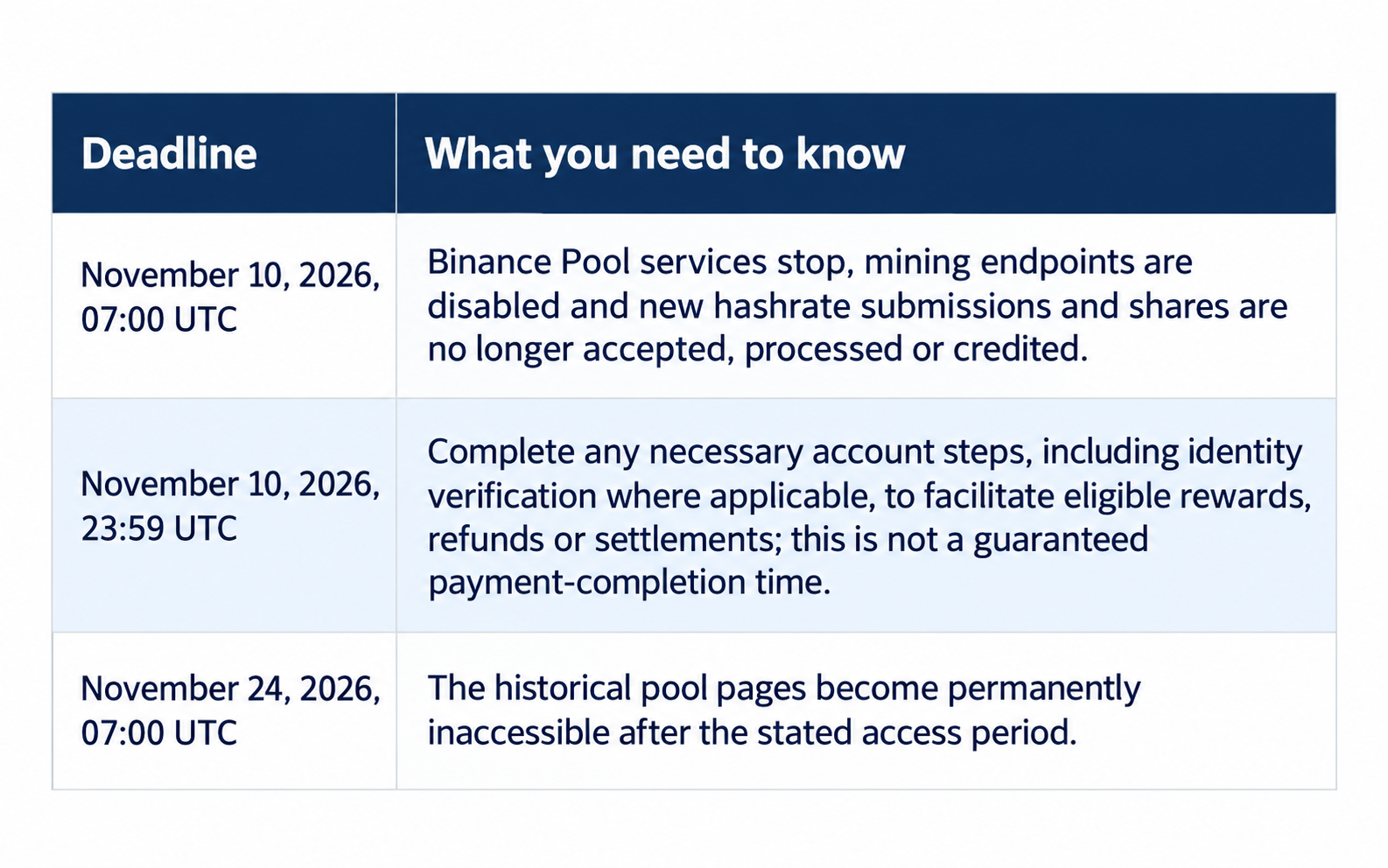
The closure includes Binance Pool, Pool Savings, Cloud Mining, Transaction Accelerator and related pool features, including APIs and hashrate notifications. Binance closure notice Check which products you actually use before deciding which actions belong on your list.
First, confirm whether you can redirect your miners
For a hardware miner, switching pools means changing the destination connection and the credentials identifying your worker; it does not change the hashing algorithm your ASIC runs. This guide focuses on that device-level move, especially for Bitcoin miners.
- If you manage your own ASICs: Confirm that you can access their configuration interface and have a record of the current settings.
- If your machines are hosted: Ask the operator who will make the change, when it can be scheduled and how each device will be checked afterward.
- If you only hold a cloud-mining contract: Do not assume you can redirect a physical miner or transfer the contract to another pool; follow the product-specific account instructions.
- If you use Pool Savings: Binance asks users to review active positions and unsubscribe or redeem before service ends.
Choose a replacement before editing your equipment
Write down your non-negotiables before comparing providers. Start with your mining coin, ASIC model, operating location, payout requirements and the person responsible for responding to problems.
Use these questions to narrow the shortlist:
- Compatibility: Does the pool support your intended coin and equipment?
- Account access: Can you use the service from your location, and are any verification steps required?
- Payment rules: Can you understand the selected reward method, fees, payout threshold and withdrawal process?
- Connection: Are the current pool addresses and backup settings clearly documented?
- Monitoring: Can you check each worker and receive useful notifications?
- Support: Can you find a legitimate support route before something goes wrong?
Do not move an entire site just because a pool appears first in a ranking. Pick a candidate you can test, with terms you are comfortable accepting.
Save your current setup and records
Before changing anything, record your existing pool entries and worker identifiers, as recommended in ViaBTC’s switching workflow. For several machines, maintain a simple device list so you can tell which miners have moved and which still need attention.
Suggested device checklist:
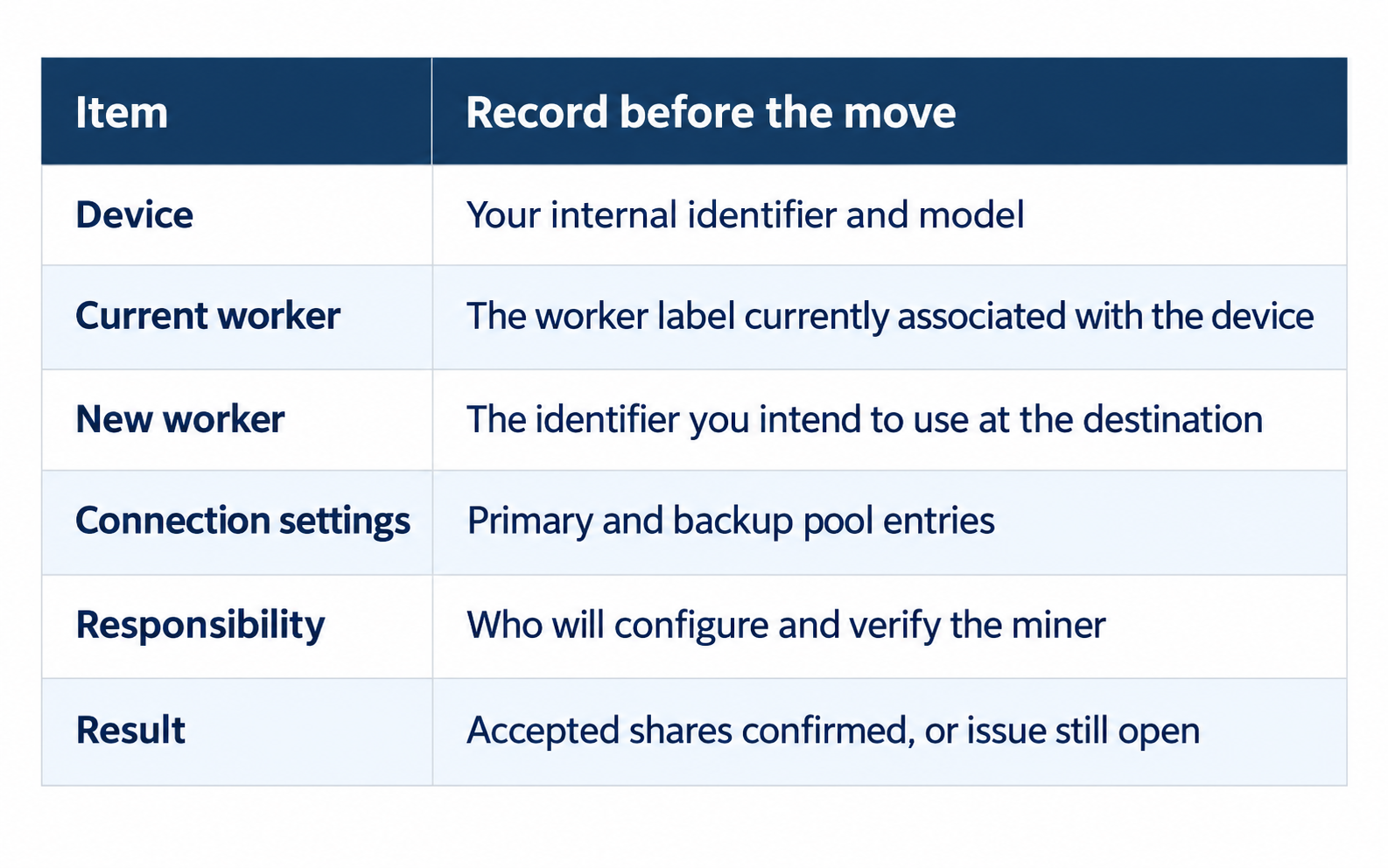
Binance also asks users to download or save relevant records, reports and transaction history before access ends. Keep account exports private and separate from any screenshots you send to support.
Test one miner using the destination’s official instructions
Copy the current coin-specific URL, port and worker format directly from your chosen pool’s official setup guide, not an old screenshot or a message from an unknown sender. Use the instructions for your miner’s firmware when applying the configuration.
A practical test sequence is:
- Prepare the destination account and choose a recognizable worker identifier.
- Enter the official connection settings on one miner.
- Configure supported backup entries and check their priority.
- Save and apply using the equipment’s documented procedure.
- Check which pool is actually active.
- Confirm accepted shares and the correct worker in the destination account.
Adding the destination as a lower-priority backup does not necessarily move the miner while a higher-priority pool remains online. Verify where the work is going rather than assuming a saved setting has taken effect.
Replace retiring backup connections, too
Check every configured pool slot, not just the first one. Binance says its mining endpoints will be disabled at the cutoff, so a saved Binance entry should not be part of your post-shutdown fallback plan.
Two ports on the same pool are alternate access options, not independent pool-level backups. Decide whether you also want an independent compatible backup pool, and test it with its own account details before relying on it.
Verify the move before changing more machines
Local hashing alone does not prove the destination pool is accepting your work; check the active connection, accepted shares and the worker under the correct account. Use those checks as the minimum sign-off for your first device.
When reviewing hashrate, compare readings over comparable time windows rather than an initial local reading against a longer pool average. Allow for the destination pool’s documented reporting delay before treating a missing worker as a configuration failure. For example, ViaBTC’s BTC setup guide recommends checking Workers and Earnings after the miner has stabilized for around 10–15 minutes. If the worker remains missing beyond the expected reporting delay or share rejections persist, investigate that device before repeating the configuration across the site.
For a larger operation, move a small batch next and keep an exception list. Configure fresh monitoring notifications rather than assuming your old alerting arrangements will carry over.
Once the connection is stable, confirm the destination pool’s withdrawal method, any applicable minimum payout threshold and the receiving address where required. After the relevant settlement cycle, check that mining earnings have been credited as expected. Accepted shares confirm that the pool is receiving your work; they do not confirm that withdrawal settings are complete.
Keep Binance balances separate from your new mining connection
Binance says eligible outstanding rewards, balances, refunds and settlements will be processed after the cutoff under applicable product rules, account conditions and compliance checks. Do not mark those account tasks complete just because a miner is working at another pool.
Keep saved records of the amounts you need to reconcile and follow Binance’s instructions for your account. Direct individual balance and settlement questions to Binance rather than expecting the destination pool to resolve them.
Frequently asked questions
Can I continue mining until November 24?
No: mining ends on November 10 at 07:00 UTC, while November 24 is the historical-page access deadline. Schedule the equipment change before the earlier deadline.
Can I guarantee a switch with no downtime?
No: the interruption depends on firmware, connection state and how settings are applied. Prepare and test early rather than leaving the change to the cutoff.
Can I keep the same worker name?
Check the destination pool’s format and use its account identifier; for example, ViaBTC specifies userID.workerID for BTC mining. Reuse a familiar device label only where it fits the new naming requirements.
If ViaBTC is on your shortlist
ViaBTC’s official BTC setup guide documents primary and alternate connection ports, worker configuration, and Workers and Earnings views for checking a new connection. Its separate notification guide explains how to configure hashrate and rejection-rate alerts through available channels such as email, app push and Telegram.
Those are useful features to include in your migration test, not a reason to skip it. If ViaBTC meets your requirements, start with its official BTC setup instructions and verify one miner before moving the rest.